
AI tools are everywhere — but choosing the right ones shouldn’t feel overwhelming. This guide cuts through the noise and shows you exactly which tools matter, what they do, and how to build a smart AI toolkit that actually improves your work.

1. Introduction
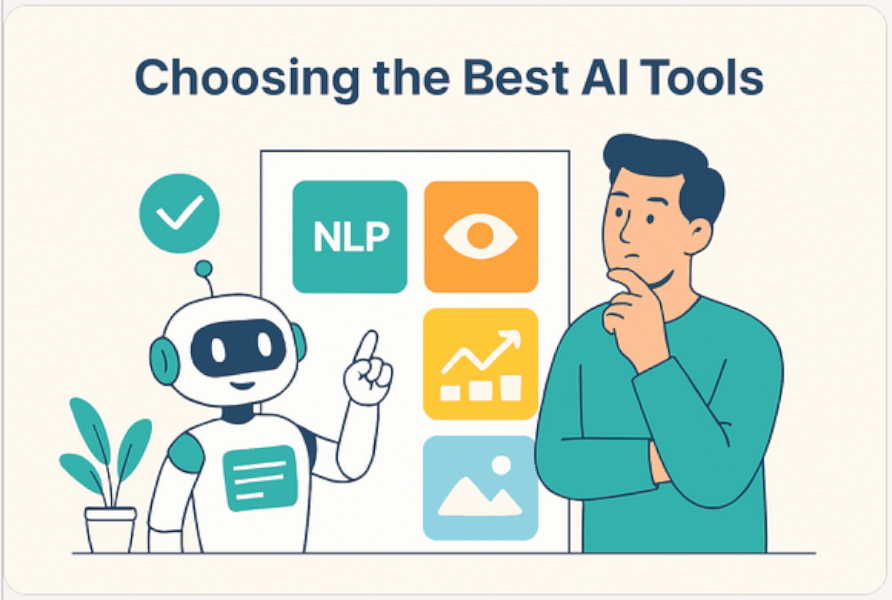
Artificial intelligence has become a core part of modern work, powering everything from writing assistants and design tools to automation platforms and developer copilots. But with new AI tools appearing every week, choosing the right one can feel overwhelming.
This guide gives you a clear, practical way to navigate the AI landscape. You’ll learn:
- What different types of AI tools actually do.
- How to choose the best AI tool for your needs.
- Which tools dominate each category.
- How to compare tools effectively.
- Real-world recommendations for different types of users.
By the end, you’ll be able to build an AI toolkit that boosts your productivity, creativity, and efficiency.
2. Understand What AI Tools Actually Do
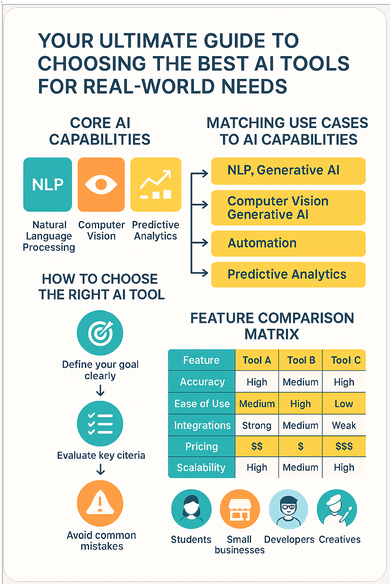
2.1 The Core Types of AI Capabilities
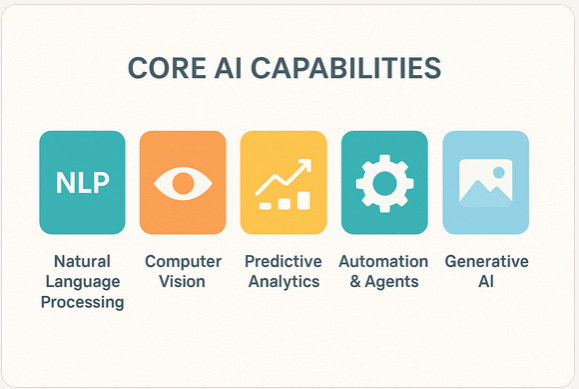
AI tools typically fall into one or more of these capability areas:
- Natural Language Processing (NLP) — writing, summarizing, translating, coding
- Computer Vision — image recognition, editing, visual analysis
- Predictive Analytics — forecasting, risk scoring, data insights
- Automation & Agents — workflow automation, task execution
- Generative AI — creating text, images, audio, video, and code
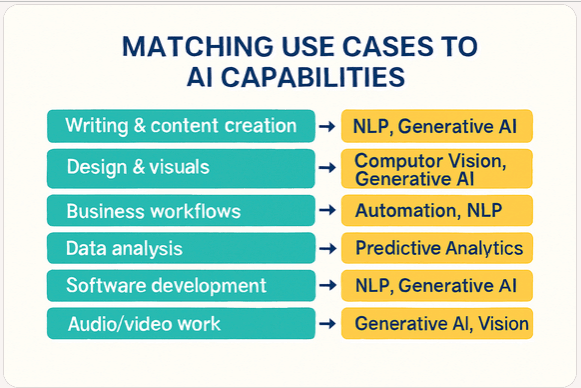
2.2 Matching Capabilities to Use Cases
Different tasks require different AI strengths:
3. How to Choose the Right AI Tool: A Practical Framework
3.1 Define Your Goal Clearly
Before choosing a tool, ask yourself:
- What problem am I trying to solve
- What outcome do I expect
- Who will use the tool
A clear goal prevents you from choosing tools based on hype.
3.2 Evaluate Key Selection Criteria
Here’s what matters most when comparing AI tools:
- Accuracy & performance — does it produce reliable results
- Ease of use — is the interface intuitive
- Integration — does it work with your existing tools
- Cost — free, subscription, or usage-based
- Data privacy & security — does it meet your compliance needs
- Scalability — can it grow with your team
- Support & documentation — is help available when needed
3.3 Avoid Common Mistakes
- Choosing tools because they’re trending
- Paying for features you don’t need
- Ignoring privacy policies
- Not testing before committing
4. Best AI Tools by Category (With Pros & Cons)
A quick overview of the strongest tools in each category.
4.1 Writing & Text Generation
Microsoft Copilot
Best for: productivity, business workflows Pros: integrated, accurate, secure Cons: best value within Microsoft ecosystem
ChatGPT-style assistants
Best for: creative writing, brainstorming Pros: flexible, conversational Cons: plugins needed for advanced tasks
Grammarly
Best for: editing and clarity Pros: excellent grammar correction Cons: limited generative features
DeepL Write
Best for: translation + writing Pros: strong multilingual accuracy Cons: fewer creative tools
4.2 Image Generation & Editing
Midjourney
Best for: artistic visuals Pros: stunning quality Cons: Discord-based workflow
Adobe Firefly
Best for: designers Pros: integrated into Adobe apps Cons: subscription required
Canva AI
Best for: social media, marketing Pros: easy to use Cons: less control for advanced users
4.3 Audio & Speech Tools
Whisper
Best for: transcription Pros: highly accurate Cons: requires setup for local use
ElevenLabs
Best for: voice generation Pros: realistic voices Cons: paid tiers for quality
Descript
Best for: podcast editing Pros: edit audio like text Cons: learning curve
4.4 Video Tools
Runway
Best for: AI video creation Pros: cutting-edge features Cons: resource-intensive
Descript
Best for: video editing Pros: simple workflow Cons: not ideal for complex projects
Adobe Premiere AI
Best for: professionals Pros: powerful Cons: subscription required
4.5 Developer & Automation Tools
GitHub Copilot
Best for: coding Pros: excellent code suggestions Cons: subscription required
Replit AI
Best for: beginners Pros: browser-based Cons: limited for large projects
AWS CodeWhisperer
Best for: AWS developers Pros: cloud native Cons: AWS-centric
4.6 Business & Productivity Tools
Notion AI
Best for: knowledge management Pros: integrated into Notion Cons: limited automation
Zapier AI
Best for: workflow automation Pros: connects thousands of apps Cons: can get expensive
Microsoft 365 Copilot
Best for: enterprise productivity Pros: deep integration Cons: requires Microsoft ecosystem
4.7 Data & Analytics Tools
Power BI AI
Best for: business dashboards Pros: strong Microsoft integration Cons: learning curve
Tableau AI
Best for: visual analytics Pros: powerful visuals Cons: expensive
DataRobot
Best for: predictive modeling Pros: enterprise-grade Cons: overkill for small teams
5. How to Compare Tools Side-by-Side
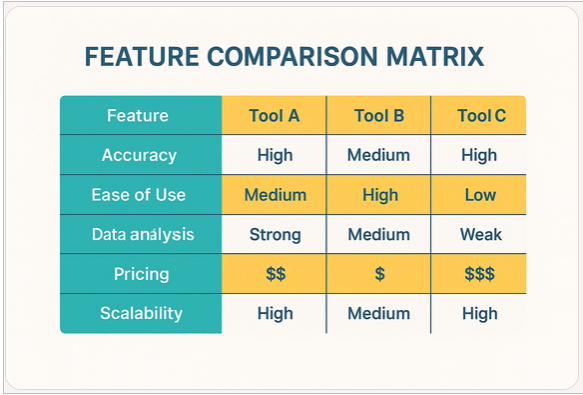
5.1 Feature Comparison Matrix
A comparison matrix helps you evaluate tools quickly:
5.2 Free vs. Paid Tools
Free tools are ideal for:
- Learning
- Light usage
- Personal projects
Paid tools are worth it when:
- You need reliability
- You work in a team
- You require integrations
- You handle sensitive data
6. Real-World Scenarios and Recommended Tools
6.1 For Students
- Copilot → research, summarization
- Notion AI → study organization
- Canva AI → presentations
6.2 For Small Businesses
- Zapier AI → automation
- Canva AI → marketing
- Copilot → email + documents
6.3 For Developers
- GitHub Copilot → coding
- Copilot → documentation
- Replit AI → prototyping
6.4 For Creatives
- Midjourney → visuals
- Runway → video
- ElevenLabs → voice
6.5 For Enterprise Teams
- Microsoft 365 Copilot → productivity
- Power BI AI → analytics
- Zapier AI → workflow automation
7. How to Test AI Tools Before Committing
- Use free trials
- Test with real tasks
- Compare output quality
- Check community reviews
- Evaluate integration options
8. Building Your Own AI Toolkit
8.1 Start Small
Choose 2–3 tools that solve immediate problems.
8.2 Expand Based on Workflow
Add tools that integrate well with your existing stack.
8.3 Keep Your Toolkit Updated
Review your AI tools every 6–12 months.
9. Conclusion
Choosing the best AI tools doesn’t have to be complicated. With a clear goal, a structured evaluation framework, and an understanding of the major categories, you can build an AI toolkit that genuinely improves your work and creativity.
AI evolves quickly — but with the right approach, you can evolve with it.
Categories